One UI Beta Program
One UI Beta Program
Beta Program is made with your valuable participation.
.jpg)
Open to all users, the One UI Beta Program is an opportunity to try One UI features before their official release.
As you preview the new features and design, send us your feedback to help us create an exceptional experience for Galaxy users. The One UI Beta Program is open to participants in Germany, India, Poland, the Republic of Korea, the United Kingdom, and the United States.
Before installing beta software, it is highly recommended to back up your data to your computer with Smart Switch. Unexpected behavior in beta software can cause data loss.
Beta Program Countries
How to Join One UI Beta Program
Join our Beta Test Program to experience the latest One UI. Send us your valuable feedback to improve Galaxy user experience.
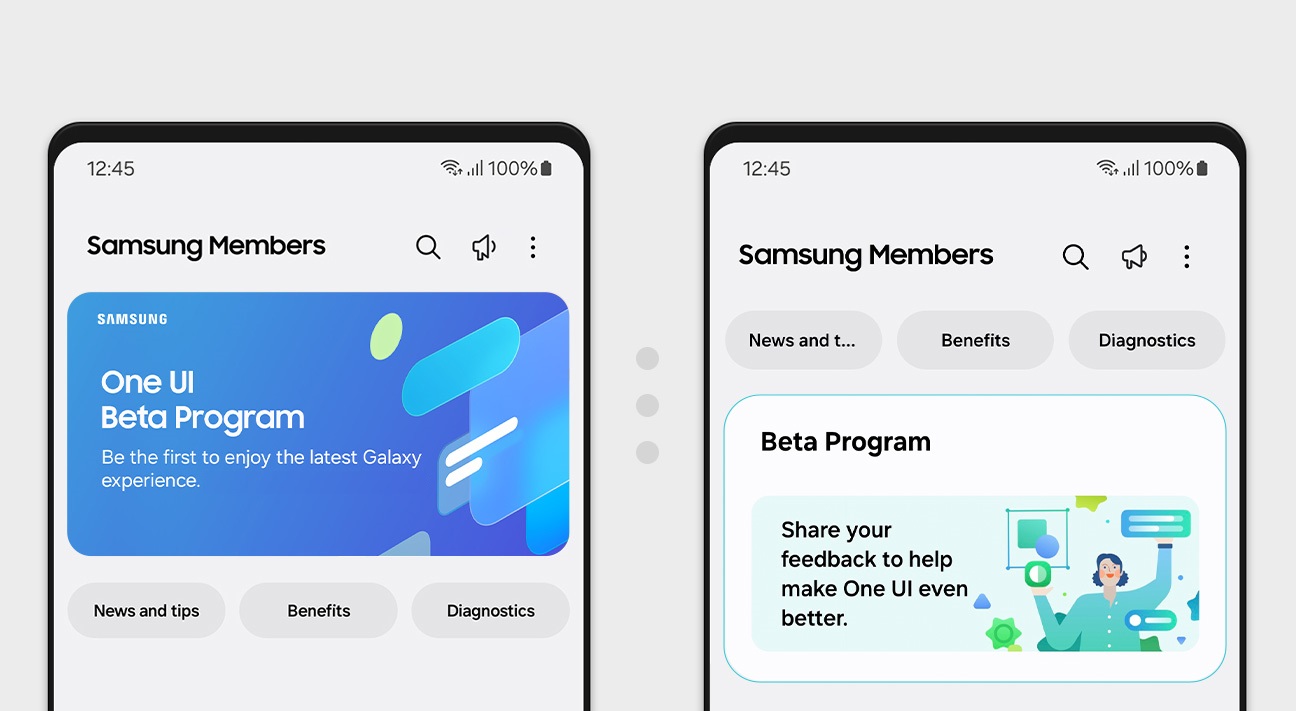
Become a Beta Tester
Download the Samsung Members application from Galaxy Store or the Google Play Store.
Log in to the application with your Samsung Account, and enter and participate in the "Beta Program" space through the home banner or the Beta Card.
Go to Samsung Members → Home Banner or Beta Card → Enter Beta Program space → Register your participation

Update the Software
On your device, select "Settings → Software update → Download and install" or enter to the detail page of the participated Beta test.
Here, you can install the beta software.
(*) Participation requires a Samsung Account. Create one at account.samsung.com
(*) Available only for specific devices, OS versions, and countries.
(*) Beta program period and compatible devices vary by country.
(*) One UI features can differ depending on the device enrolled.
Beta Activities
Help Samsung gather helpful insights and feedback about beta software features, performance, and usability to develop more reliable, higher-performance software, and give Galaxy device users an improved and optimized experience.

Reporting Errors
When you have enrolled in the One UI Beta Program, you can help improve the Galaxy software stability by reporting issues you encounter while using the beta software.
To provide feedback on bugs or errors in beta software, in the Samsung Members application, navigate to:
⚠ Submit the report within 3 minutes of encountering the bug or error, and do not terminate (swipe away) the Samsung Members application until notified that the report has been sent. This can take up to 5 minutes.

Making UX Suggestions
You can experience the new UX and contribute to the Galaxy user experience through the community, such as by providing suggestions.
To provide UX or UI-related feedback, such as usability or feature suggestions, navigate to:
ℹ The "Beta community" area is only available during the public beta period.
FAQ
Find the most frequently asked questions and answers for One UI Beta Program
The One UI Beta Program is owned, managed, and operated solely by Samsung. Its purpose is to create a better, more reliable operating system and user experience (UX) for Samsung devices, based on user feedback.
As a Beta Program participant, you can preview new features and UX for the latest Android operating system, and submit feedback about its performance, stability and usability.
To participate in the One UI Beta Program, you will need to install Beta software. Beta software is intended only for testing purposes and may contain bugs, errors, and inaccuracies or behave unexpectedly. The Beta software is provided "as is" and "as available", without any warranty of any kind from Samsung. Your use of the Beta software is at your own discretion and risk.
There is no cost to participating in the One UI Beta Program. However, you are responsible for expenses related to using a data network connection to download the Beta software or upload error logs.
Connecting to Wi-Fi before downloading Beta software is highly recommended.
The One UI Beta Program is an opt-in, voluntary program. Your reward for participation is improved software for Samsung devices based on your feedback.
To participate, you must register through the Samsung Members app on your device:
- In the Samsung Members app, log in with your Samsung Account. If you do not have a Samsung Account, create one.
- Select "Notice, Banner, Beta card → Registration for One UI Beta Program".
- Complete and submit the intention to participate.
If you meet the participation criteria, you will be enrolled in the One UI Beta Program.
Unexpected behavior in the Beta software can cause data loss. Before installing the Beta software, it is highly recommended to back up your data to your computer with Smart Switch PC version.
You must be enrolled in the One UI Beta Program to install the beta software. To avoid compatibility issues, before installing the Beta software, make sure all applications on the device are updated to the latest version available.
To install the Beta software, on your device, select:
Or navigate to: Participated Beta test → detail page → Software update
Beta software updates are rolled out gradually to One UI Beta Program participants.
If an error occurs during beta software installation and you can no longer use your device, find assistance with resetting the device by visiting the nearest Samsung Service Center.
To participate in the One UI Beta Program, you agree to use the Beta software only for personal, non-commercial purposes, and to abide by the One UI Beta Program terms and conditions.
User feedback is submitted through the Samsung Members application on your device:
- To report bugs or errors: Participated Beta test → Send feedback
- For UX/UI suggestions: Participated Beta test → Beta community → Suggestions
⚠ To ensure relevant log information is included in the error report, submit the report within 3 minutes of encountering the bug or error, and do not terminate the Samsung Members application until you are notified that the report has been sent. This can take up to 5 minutes.
Yes. You can update the software to the latest official version or reset it in a Service Center. As long as you are enrolled in the One UI Beta Program, you can re-install the beta software by running a software update on the device:
This option is only available if you have not opted out or canceled your participation in the One UI Beta Program.
- To withdraw, apply for withdrawal through Samsung Members app on your device:
Samsung Members → Settings → Beta program settings → Withdraw from beta program - To remove the Beta software, perform a rollback to the previous release version using Smart Switch PC Version on your computer. The rollback resets the device and removes data generated during beta testing.
If you backed up your device data with Smart Switch, you can restore the data after the rollback process. To perform the rollback, connect the device to your computer with a USB cable, launch Smart Switch, and select "Downgrade".
It is not possible to provide a specific date for publishing the release version. The release version will be provided as soon as Beta feedback is analyzed and improvements are implemented.
Until then, you can continue to use the Beta software version and update your device to the official release version once it is made available.
Please post your question in Beta Community on the Samsung Developer forum.
Ready to Join the One UI Beta?
Download Samsung Members and register for the beta program today. Shape the future of One UI with your feedback.


COMMENTS